


Searching. Following up. Routine tasks. Manual handoffs. Much of this takes up time today without creating real value. AI agents take over these repetitive steps, make distributed knowledge actionable, and free up teams’ time for what matters most. Right within Microsoft 365.
From Hype to Leverage
AI doesn't just wait for prompts.
She becomes part of the process.
Most companies are already using many AI tools. But tools alone don’t change a process. AI agents take over defined process steps, consolidate information, and deliver concrete results rather than just answers.
Less manual routine work
Faster recurring processes
Distributed Knowledge Becomes Actionable
Relief for Departments and Support
AI has long been relevant. However, it is often not yet being implemented.
The AI readiness check
Test your company 's AI potential in just a few minutes
Whether you are a CEO, Head of Marketing or Head of IT – with this free AI readiness check, you can find out in just 5 minutes how AI-ready your company is and how you can take your company to a new level.
You will then receive a detailed AI readiness report with specific recommendations for action.

Three agents. Three industries.
A common pattern.
Existing knowledge becomes actionable, and recurring inquiries are answered automatically—right where employees are already working.

SOLTOP Energie AG
Sunny
At SOLTOP, technical documentation was scattered across the internal drive. Employees in engineering, sales, and support wasted time searching for information or had to rely on individual experts.
Sunny makes this knowledge available directly in Microsoft Teams. The result: faster access to knowledge, less reliance on individual employees, and shorter response times in customer service.

Ella
The University of Teacher Education St. Gallen wanted to make HR information more accessible to its employees. The existing intranet search often yielded unsatisfactory results, and recurring HR inquiries took up time that could have been spent on personal consultations.
Ella answers questions throughout the entire employee life cycle directly on the HR intranet, around the clock, drawing on more than 100 HR documents. This frees up the HR team’s time for one-on-one consultations.

BERNINA Mate
More than 2,000 dealers in over 100 countries need quick answers regarding service, repairs, replacement parts, and sales. The information was scattered across manuals, videos, and systems, and responses depended on the availability and time zone of individual contacts.
BERNINA Mate answers these questions directly in the dealer portal, around the clock, via text or voice. It not only provides an excerpt from the manual but also plays the relevant video right at the appropriate point. The result: instantly accessible knowledge, faster onboarding, and less reliance on individual people.
More AI Projects from Our Practice




Agents need the right starting point.
Online helps you identify exactly these processes, prioritize meaningful use cases, and develop productive solutions based on them. We combine business acumen, Microsoft expertise, project methodology, and change management know-how—from the initial idea through the proof of concept (PoC) to rollout and adoption. This ensures that AI agents don’t become just another tool, but rather an effective part of your workflows.
Five Reasons to Go Online
Business Before Technology
We start with the process, not the tool. What matters is not what is technically possible, but where AI agents measurably reduce the workload, speed up processes, or improve quality.
Meaningful Use Cases
We'll help you identify, evaluate, and prioritize meaningful areas of application—so that your many ideas can turn into the right next steps.
Microsoft Expertise Combined with the Ability to Deliver Results
We integrate Microsoft 365, Copilot, Copilot Studio, Azure OpenAI, Power Platform, and your existing systems into robust solutions.
Evidence from real AI projects
Not just theory, but projects that have been implemented. AI agents like Sunny and Ella, as well as numerous AI solutions at Swiss companies, show that our approach works in practice.
From PoC to Adoption
We guide you every step of the way—from the initial idea through the proof of concept (PoC) to rollout, training, and adoption. Business units, IT, and employees are involved from the very beginning. After all, an agent is only effective if it’s actually used.
AI agents don't just answer questions. They perform tasks.
AI agents are digital process actors. They respond to defined triggers, follow clear rules, use data from existing systems, and produce concrete results: a response, a system entry, an escalation, a notification, or a predefined decision. This is how AI evolves from a personal assistant to an operational building block of your business processes.
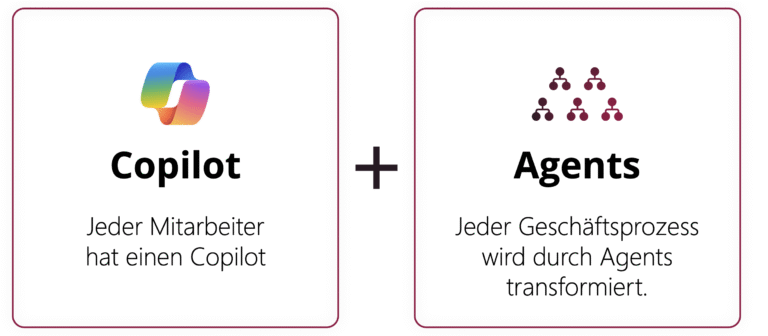
Copilot supports people. AI agents drive processes.
More About AI Agents
What they do, how they work, and how companies can get started with them step by step.
What AI Agents Actually Do
AI agents are most effective when information from multiple sources is consolidated, decisions are made according to clear rules, and recurring tasks are currently performed manually.
Areas of Expertise
Automate tasks
Perform repetitive tasks, verify information, draft responses, or initiate follow-up actions.
Analyze and Consolidate Data
Put information from Microsoft 365, SharePoint, CRM, Dataverse, or other systems into the right context.
Preparing Decisions
Prioritize inquiries, suggest next steps, or prepare the basis for decision-making.
Responding to Events
Don't just work on request; respond to triggers—such as new emails, CRM changes, SharePoint entries, or HR processes.
From the Trigger to the Result
AI agents are not isolated chat windows. They are orchestrated process components: They respond to defined events, follow rules, access data and applications, and produce concrete results.
#1 Trigger
A new email, a modified CRM record, a SharePoint item, an HR hire, or a schedule.
#2 Instruction
The agent knows the objective, the rules, their role, and the limits.
#3 Planning and Execution
It uses data, business logic, and applications—such as CRM, Microsoft Graph, Dataverse, and other systems.
#4 Result
This results in a specific action: a response, a system entry, an escalation, a notification, or a decision proposal.
From Assistance to Process Intelligence
AI agents are not an all-or-nothing issue. Companies evolve gradually—from personalized support to orchestrated agent processes.
Three Levels
Phase 1: Person with an assistant
Employees use AI to assist them in their day-to-day work.
Phase 2: Human-Agent Teams
Agents handle specific tasks and work alongside people.
Phase 3: Humans lead, agents execute
Multiple agents support coordinated workflows and handle entire sub-steps of a process.
Where AI Agents Create Real Value
AI agents are particularly effective in situations where knowledge is distributed, inquiries are repetitive, and processes involve manual handoffs. They take on specific tasks, thereby improving workflows, response times, and the basis for decision-making.
Use Cases
Service & Support
Automatically answers recurring standard questions, just as Sunny does at SOLTOP. Response times are reduced, and the support team gains time to focus on complex cases
Sales & CRM
It consolidates customer history, prioritizes leads, and sends reminders for follow-ups. This makes sales opportunities more visible and conversations more relevant.
HR & Internal Services
It answers recurring employee questions and provides guidance, just like Ella does at PHSG. This takes some of the pressure off the HR team and allows for more personalized counseling.
Knowledge management
Makes content from SharePoint, Teams, the intranet, and documentation accessible. Existing knowledge becomes available for everyday work instead of just sitting there.
Back Office & Approvals
Checks input data, escalates special cases, and prepares decision documents. Processes become more consistent, and manual verification steps are reduced.
Integrated into your Microsoft ecosystem
AI agents demonstrate their value when they are embedded in existing processes, data, and systems. This results in solutions that build on existing data, roles, and systems—secure, interoperable, and ready for everyday use.

Microsoft Copilot 365
AI in the Daily Workflow.

Azure OpenAI Service
Enterprise AI in the Microsoft Cloud.

Copilot Studio
Custom agents for specific use cases.

Microsoft Graph
Context from your Microsoft environment.

Power Platform
Data, Logic, and Workflows for Business Processes.

Fabric
Data and analytics on a single, centralized platform.

Foundry
Develop and operate AI models and applications.
From Process to Productive Agent
#1 Start
Together, we identify the right use case and determine whether the necessary data and knowledge base are available.
#2 Learning
We are developing an initial prototype and testing whether the agent works effectively in everyday situations.
#3 Growing
We involve employees and gradually expand the agent until it is fully integrated into your Microsoft and process environment.
Where is your first use case?
Getting started with AI agents doesn’t have to be a big or complex undertaking. The key is to have a clearly defined use case that delivers quick results and can be expanded later. These points will help you identify it.
Questions or tasks are repeated
Employees spend time searching
Documents and data sources are available
Knowledge is scattered across multiple locations
Processes are clear and transparent
Departments see the benefits firsthand
From Concept to Practice
What AI agents can really do and how they work with Microsoft Copilot 365. Explained in a practical way in a webinar by our AI experts.
In what area could an agent help you first?
Perhaps for recurring questions. Perhaps for knowledge that’s scattered across different sources. Perhaps in areas where teams today spend a lot of time searching, forwarding, or manually verifying information. Together, we’ll identify the first meaningful use case: clearly defined, quick to test, and close enough to everyday work to make the benefits visible.
Or just get in touch with us—it's easy.