

Microsoft Build 2026 Focuses on AI Agents
Our webinar on June 25, 2026, showed that developments surrounding Microsoft Copilot, AI agents, and agent-based systems are continuing to gain momentum. The webinar focused on the most important AI and Copilot news from Microsoft Build 2026 in San Francisco and the question of what these innovations specifically mean for businesses.
Microsoft Build is Microsoft’s most important developer conference and provides an annual preview of new platforms, tools, and technologies. In 2026, the conference was clearly focused on AI agents and productive AI. It became clear that the focus is no longer just on individual chatbots or isolated demos, but on an integrated system in which agents can perform real work across functions, processes, and data sources.
It’s not the protest that wins, but the system behind it
A key message of the webinar was this: In the age of AI agents, it’s not the companies with the most demos that win, but those with the best system behind them. Models alone are not enough. What matters most is how agents are built, contextualized, operated, monitored, secured, and continuously improved.
This is precisely where the strength of the Microsoft ecosystem lies. Many companies already use Microsoft 365, Teams, SharePoint, Outlook, Entra, Purview, Defender, Power Platform, or Dynamics 365. As a result, identities, data, permissions, compliance structures, and work contexts are often already in place. This foundation is crucial to ensuring that AI agents do not operate in isolation but can be securely and effectively embedded into existing processes.
AI Becomes Part of the Operating Model
AI is evolving from a tool that is actively used into a digital workforce within the process. This is also changing the way companies organize work. In the future, the central question will no longer be simply: Which tool do we use? Instead, it will be: Who takes on which task—human, copilot, or agent—and under what rules, permissions, and controls?
Microsoft describes this development using the concept of “Frontier Firms.” In the first phase, humans work alongside an AI assistant. In the second phase, human-agent teams are formed, in which agents take on defined tasks. In the third phase, humans lead while agents perform operational work within clearly defined parameters.
The greatest benefit does not come from simply making existing processes a little faster. The real impact comes when processes are reimagined using agents.
Copilot Cowork is now commercially available
A significant portion of the webinar was devoted to Copilot Cowork. Copilot Cowork has been commercially available since June 16. Cowork is no longer a separate agent but is now part of Microsoft 365 Copilot. This means that agent-based tasks appear directly within the familiar Microsoft 365 workflow.
Copilot Cowork helps users delegate tasks, track work progress, and produce results within the context of their existing Microsoft 365 environment. Unlike traditional chat interactions, the focus is not just on answering individual questions, but on planning, executing, and driving specific work packages forward.
Copilot Studio Becomes a Platform for Custom Agents
A Microsoft 365 Copilot license is required to use the service. In addition, there are usage- and volume-based costs, which can be managed through the appropriate policies in the tenant. This is particularly important for businesses, as it allows them to better control budgets, usage, and costs.
Copilot Studio was also further developed at Microsoft Build. The new experience is more focused on agents and combines generative capabilities with traditional workflows. It is precisely this combination that is crucial: Many business processes consist not only of free-form dialogue, but also of structured procedures, rules, approvals, and system actions.
During the webinar, this was demonstrated using the example of a visit log agent. The agent guides employees step by step through the relevant questions, creates a visit log based on their responses, and then enters the information directly into the CRM. In addition, the agent can schedule follow-up tasks and use information from connected systems.
This example clearly illustrates the direction in which the technology is heading: domain expertise, process knowledge, and system access are all bundled into a single agent. The agent not only handles text generation but also supports the entire process—from data capture and structuring to transfer to the target system.
MCP as a Link to Business Systems
An important component here is MCP, the Model Context Protocol. In the webinar, MCP was described, in essence, as a kind of USB-C for agents. It enables agents to access connected systems and functions—for example, a CRM such as Dynamics 365 or other line-of-business applications.
The key point here is that the agent does not have unlimited rights. It inherits the permissions of the respective user. This means it can only access the information and perform the actions that the human user is also permitted to access and perform. For companies, this is an important prerequisite for deploying agents in a productive, controlled, and traceable manner.
Scout: Microsoft’s First Always-On Agent
One particularly exciting preview was Microsoft Scout. Scout was introduced in the webinar as the first so-called “Autopilot.” While Copilot Cowork handles tasks that are intentionally delegated, Scout runs continuously in the background. It is an always-on agent that acts on the user’s behalf.
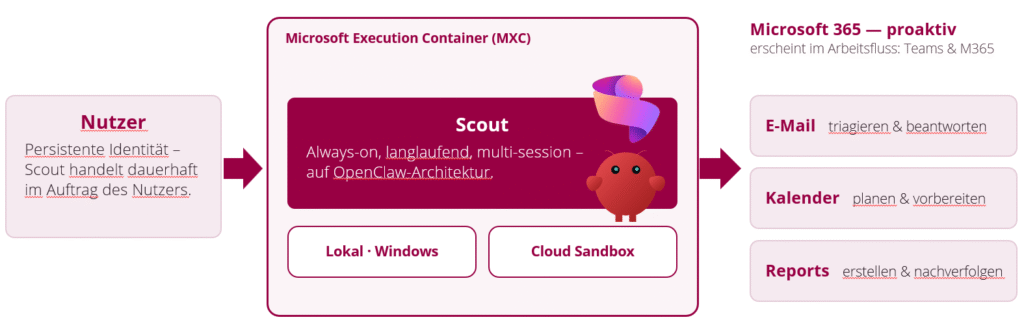
Scout can access information from Teams, Outlook, OneDrive, SharePoint, chats, emails, calendars, and contacts. This makes it a kind of personal chief assistant within Microsoft 365. For example, it can triage emails, organize calendars, prepare reports, or identify risks early on.
The main difference between Scout and Copilot Cowork lies in their long-term applicability. Cowork is suitable for delegated tasks or recurring work packages. Scout is designed for continuous, proactive support. Scout is currently still part of the Frontier program and is therefore not intended for widespread deployment in production environments. Companies should first test such new features in a targeted manner within controlled test environments.
Microsoft IQ Brings Context to Agent-Based Systems
For Copilot, Cowork, Scout, and custom agents to work effectively, they need context. Microsoft summarizes this context under the term “Microsoft IQ.” This refers to different levels of enterprise knowledge.
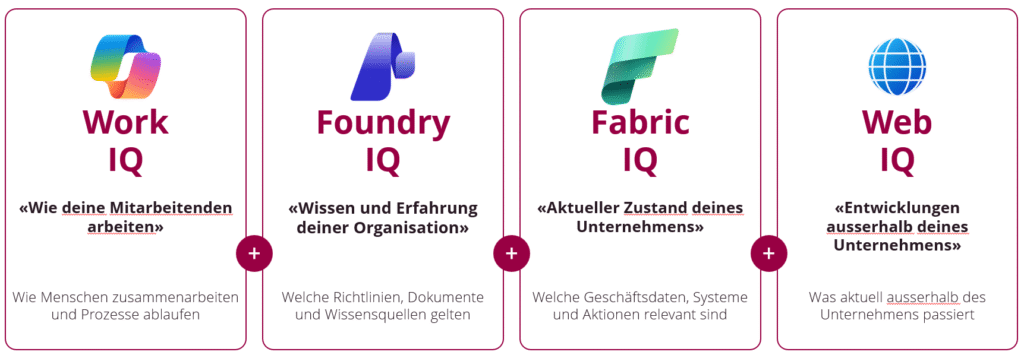
Work IQ describes how employees collaborate and identifies the relevant relationships, roles, documents, and work contexts. Foundry IQ incorporates policies, documents, and knowledge sources into more complex agent scenarios. Fabric IQ provides business data and system context from operational data sources. Web IQ supplements this with external information and developments outside the company.
Together, this creates a context layer for enterprise AI. This is crucial to ensure that agents do not merely provide generic responses, but can act within the specific business context.
Microsoft Agent 365 Helps You Manage the Flood of Agents
The more agents there are in companies, the more important transparency, governance, and security become. The webinar cited a figure of 1.3 billion agents by 2028. Regardless of the exact trend, one thing is clear: companies need a way to maintain an overview.
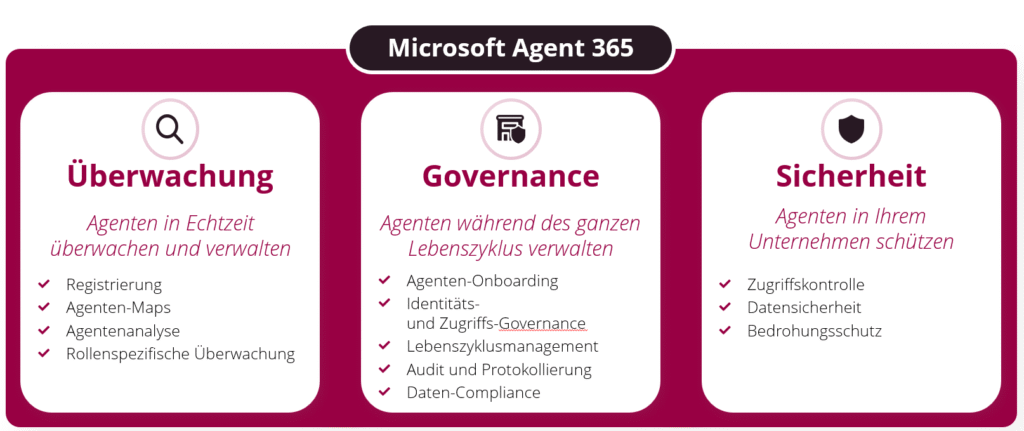
Microsoft Agent 365 was introduced specifically for this purpose. It serves as a network control center for agents and helps organizations with monitoring, governance, and security. This includes, among other things, agent registration, agent maps, agent analytics, role-based monitoring, identity and access governance, lifecycle management, auditing, logging, data compliance, access control, data security, and threat protection.
This is a key issue for companies. Agents must not be allowed to grow unchecked. They need clear guidelines, defined responsibilities, and monitoring capabilities. This is the only way to safely scale agent-based AI.
Governance remains the foundation of trust
It became clear several times during the webinar that AI agents can only deliver lasting value if governance, security, and compliance are taken into account from the very beginning. This is especially true in regulated industries or when dealing with sensitive data.
The good news is that companies don’t have to start from scratch. Microsoft is extending existing infrastructure—such as the Microsoft 365 Admin Center, Entra, Purview, and Defender—to include agent management. This enables organizations to protect agent identities, control access, classify data, and monitor risks.
At the same time, it remains important to properly prepare your own data infrastructure. Permissions, data classifications, storage locations, processes, and responsibilities must be clearly defined. AI makes existing information architectures more transparent. Those who have their governance under control lay the foundation for secure and effective agent scenarios.
AI Readiness: Many Companies Are Still in the Early Stages
Our AI Readiness Benchmark, which surveyed over 500 companies, continues to paint a clear picture: 97 percent of companies consider AI important for their business. At the same time, 79 percent lack a prioritized list of processes with AI potential. 82 percent rate their employees’ level of training in AI as insufficient.
These figures show that while interest is high, many organizations have yet to translate this into concrete processes, skills, and prioritized use cases. This is precisely where it will be determined whether AI remains a one-off experiment or becomes part of a genuine transformation.
Would you also like to experience the AI readiness of your company?
Take the free AI readiness check here!

From an Idea to a Concrete Use Case
To help companies get started in a structured way, we have developed two workshop formats: the Idea Sprint and the Use Case Workshop.
The goal of an idea sprint is to identify potential, gather ideas, group topics into clusters, and prioritize them based on their value and feasibility. Employees who are already experimenting with AI and bring concrete ideas from their day-to-day work are particularly valuable in this process.
The use case workshop takes a more concrete approach. There, processes are analyzed, target scenarios are defined, data sources are reviewed, and systems and access points are examined, leading to the development of realistic solutions. The goal is to produce a concrete concept, including an initial cost estimate.
The path to AI transformation is therefore not a single IT project, but rather a process of learning and change. Successful companies take a pragmatic approach, learn quickly, and grow step by step.
Questions from the webinar: Costs, areas of application, and regulated environments
During the Q&A session, many practical questions were asked. One topic was the use of custom agents without a Microsoft 365 Copilot license. The answer: Even employees without a Microsoft 365 Copilot license can use certain agents, provided the appropriate billing policies are in place. Billing is volume-based.
Cost control was also discussed. For Copilot Cowork and similar usage-based scenarios, budgets and limits can be defined. In addition, Microsoft offers dashboards to monitor usage and make targeted adjustments as needed.
Another topic was the use of agents in small businesses. The key point here is that agents aren’t just relevant for large companies. What matters is the specific use case. Repetitive, administrative, or time-consuming tasks, in particular, can also deliver tangible benefits in smaller organizations. It’s important to start small, gain experience, and realistically assess the benefits.
Regulated environments were also discussed. In this context, clarity is needed above all regarding data classification, storage locations, access rights, and regulatory requirements. The more sensitive the data, the more important it is to ensure thorough preparation before agents are deployed in a production environment.
What Companies Should Take Away from This
The key takeaway from the webinar is that AI agents are no longer a topic for the future—they are gradually becoming part of our daily work. To support this, Microsoft is building a comprehensive ecosystem consisting of Copilot, Cowork, Copilot Studio, Scout, Microsoft IQ, Foundry, Fabric, and Agent 365.
For companies, this means: Now is the right time to take a close look at their own operating model. Which processes are suitable for agent-based support? Where does real value lie? What data, permissions, and governance structures need to be put in place? And how can employees be empowered to collaborate productively with agents?
Those who address these questions early on can not only use AI on an ad hoc basis, but also integrate it strategically into processes, teams, and business models.
Microsoft Build 2026 Points the Way to an Agent-Driven Workplace
Microsoft Build 2026 made it clear where things are headed: away from pure assistance and toward agent-based systems that actively take over tasks, coordinate them, and are embedded in existing business processes.
Copilot Cowork integrates delegated tasks into the Microsoft 365 workflow. Copilot Studio enables you to create custom agents for specific processes. Scout demonstrates how always-on agents can work proactively in the background in the future. Microsoft IQ provides the necessary context, and Agent 365 lays the foundation for monitoring, governance, and security.
This creates a new vision of work: People remain in charge, setting priorities and exercising control. Agents take on operational tasks within clearly defined parameters. This is precisely where the potential for the next stage of digital transformation lies.
Do you have specific questions or use cases that you would like to discuss in more detail?
Our experts are happy to provide advice and assistance.

Book an appointment directly here!